
How to choose an antivirus without relying on review sites
Disclosure. This site is funded by advertising and is paid a commission when a reader subscribes through a partner link. That is a conflict of interest, and the honest response to it is to tell you how to reach your own conclusion rather than to hand you a ranking. That is what this page does.
A method you can apply yourself, in about twenty minutes, using primary sources rather than commission-funded comparison tables.
Start by deciding whether you need to buy anything
Windows includes built-in antivirus protection that is scored by the same independent laboratories as the paid products, and it performs respectably. For a user who keeps their system patched, uses unique passwords, and holds a backup, it may be enough. The case for paying is the additional components, a single support contact, and cross-platform coverage — not the idea that the free option leaves you defenceless. Deciding this first saves you from comparing products you did not need.
Read one laboratory round, not ten review sites
Three laboratories publish comparative tests of consumer products: AV-TEST (Germany), AV-Comparatives (Austria) and SE Labs (United Kingdom). Their reports are free to read and state the versions tested and the dates.
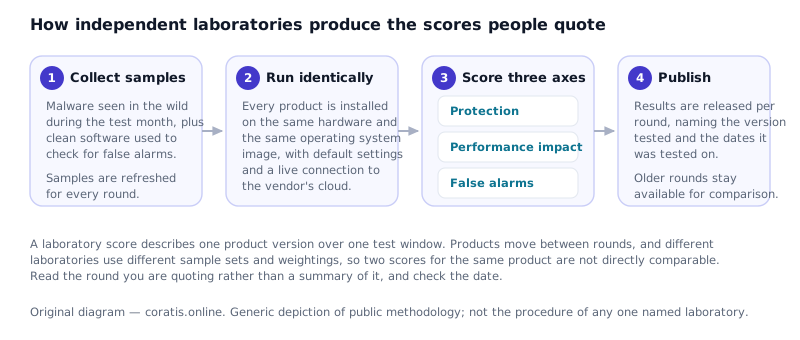
Three cautions when you read one:
- Check the date and the version. A result from two years ago describes software that no longer exists in that form.
- Look at the false-positive column. A product that blocks legitimate software will cost you more time than the malware it stopped.
- Do not compare across laboratories. Weightings and sample sets differ; the numbers are not on the same scale.
Match the tier to your actual situation
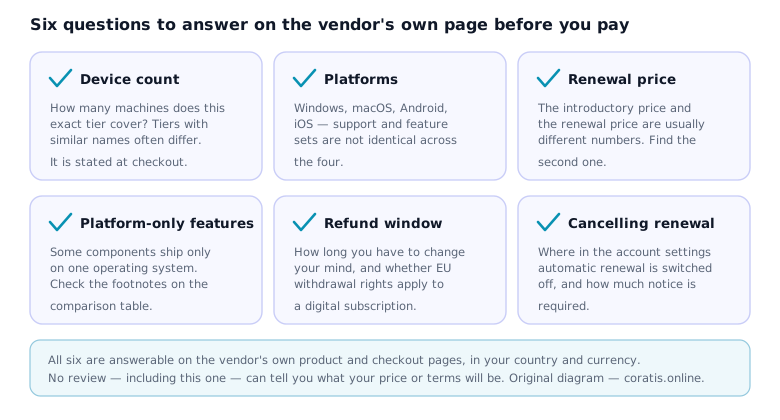
Most of the money people waste on security software is spent on the wrong tier rather than the wrong brand. Write down two numbers before you look at any product page: how many devices you need to cover, and which operating systems they run.
Price the second year, not the first
Consumer security software is almost universally sold at an introductory discount that does not apply on renewal. The renewal rate is disclosed in the terms rather than the headline. Find it before you subscribe; it is the number you pay for as long as you keep the product.
While you are there, locate where automatic renewal is switched off. Doing it on day one takes a minute. Doing it in month eleven takes considerably longer.
What to ignore
- Star ratings on commission-funded sites, including any this site might ever be tempted to publish. A number nobody can audit is decoration.
- Countdown timers and “only N licences left”. Software does not run out. Artificial urgency is a sales technique, not information.
- Testimonials without a verifiable source. If you cannot tell who said it, it tells you nothing.
- “Best antivirus 2026” listicles whose ordering changes with the commission rate. Compare the ordering across three such sites and the pattern is usually visible.
- Detection percentages quoted without a source and a date. They are either copied from an old round or invented.
After you install
- Remove the product you are replacing. Two real-time scanners on one machine cause conflicts.
- Leave automatic updates on.
- Set up a backup that is not permanently connected to the machine.
- Turn on two-factor authentication for email first — it is the account that can reset all the others.
If, having done all that, you conclude that an entry-level paid suite is what you want, the explainer on Norton AntiVirus Plus sets out what that particular tier contains.
That is a page on this site, not a partner link. It is advertising-funded and does carry partner links, and the disclosure is repeated at the top of it.
Written by Oliver Young for DELTA BARS s.r.o., published 25 September 2026. General information, not professional advice.